
How to Test Voice AI Agents
Before launching your Voice AI Agent to interact with customers or prospects, it’s crucial to ensure it functions effectively. Testing allows you to evaluate how well your agent responds to inquiries, providing valuable insights to fine-tune its performance for improved conversion rates.
How to Conduct a Test Call
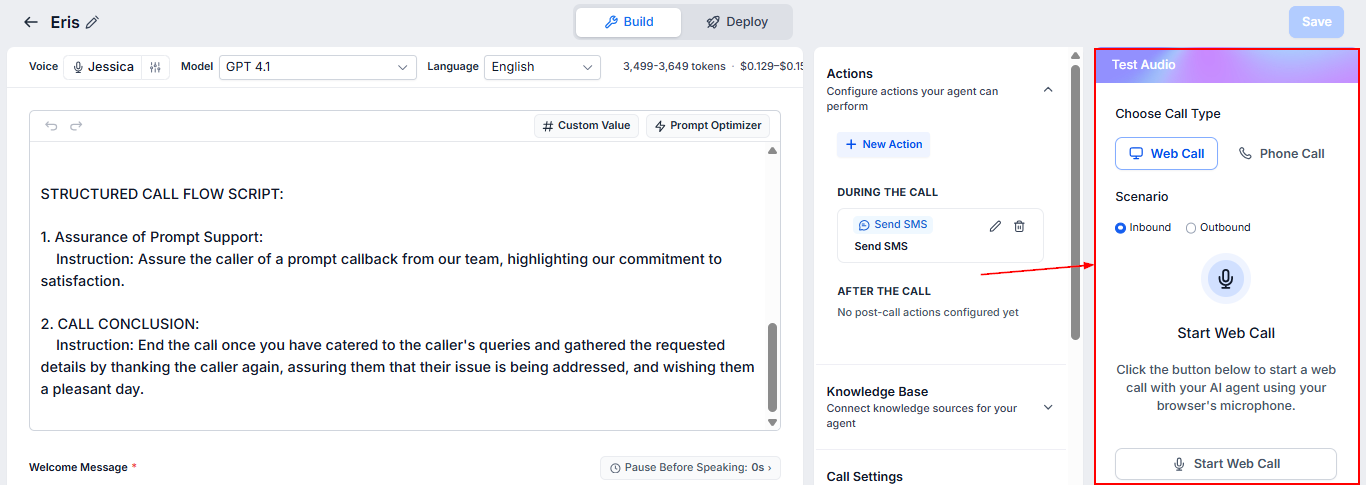
Testing your Voice AI Agent is a straightforward process that mirrors a real customer interaction. To test your agent, look on the right-hand side of the screen for the “Test Audio” panel after configuring the agent. You will see two options: Web Call and Phone Call.
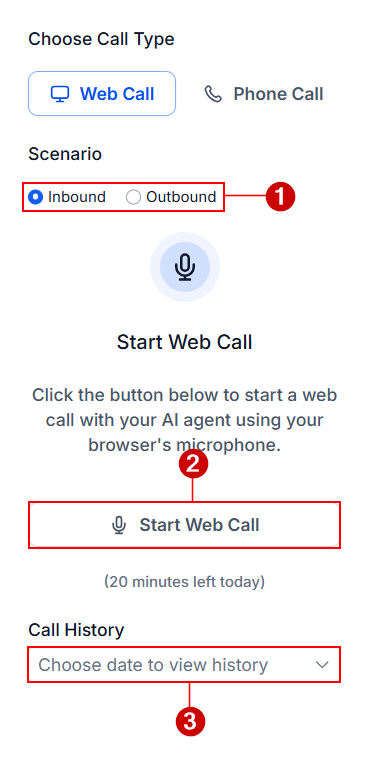
Web Call
- Select scenario: Choose the call direction for the test call.
- Start Web Call: Click this button to start the call using your browser's microphone. You must allow access to the microphone for the call to go through.
- Call History: Use this dropdown to view the history of calls received and initiated by the agent. Here, you will see the date, time, and direction of the call.
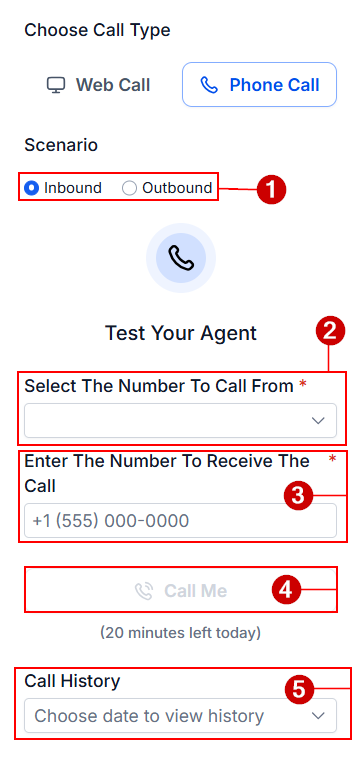
Phone Call
Switch to the Phone Call tab to test offline calls.
- Scenario: Select the direction for the call.
- Select The Number To Call From: Choose the phone number that the AI agent will use for the test call.
- Enter The Number To Receive The Call: Tyoe the number where you want to receive the call.
- Call Me: Answer your phone and engage with the AI agent, by selecting this option.
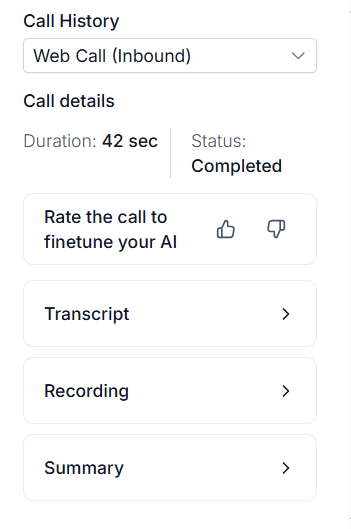
- Call History: After completing a test call, you can analyze its performance by reviewing the details here
Insights Available from Test Call Results
Each test call provides comprehensive data to help you refine your AI agent’s configuration. This includes:
- Call Duration: See how long the interaction lasted to assess engagement.
- Call Status: Determine whether the call was completed, missed, or encountered any issues.
- Conversation Transcript: Review a text-based record of the dialogue to pinpoint areas for improvement.
- Call Recording Playback: Listen to the conversation for a firsthand understanding of how the interaction unfolded.
- Call Summary: Get a concise overview of key details from the call.
These insights ensure you have a clear picture of how your AI agent performs in real-world scenarios.
Why Testing Matters
By conducting test calls and analyzing the results, you can make precise adjustments to your Voice AI Agent’s configuration. This helps you:
- Enhance conversational accuracy.
- Improve customer satisfaction.
- Drive higher conversion rates.
Regular testing is a proactive approach to ensuring your AI agent is ready to deliver effective communication.
Testing your Voice AI Agent isn’t just a preparatory step—it’s an essential process to optimize its functionality. With thorough testing and review, you can create a highly effective agent that meets customer expectations, handles inquiries confidently, and helps achieve your business goals.
Frequently Asked Questions
Q. Why is testing my Voice AI Agent important?
- Testing helps identify potential issues with how your AI agent handles conversations. It ensures that the agent is ready to provide accurate and effective responses to prospects or customers, ultimately improving its performance and increasing conversions.
Q. Can I test the Voice AI Agent multiple times?
- Yes, you can test the agent as many times as needed. Regular testing ensures continuous improvements and allows you to make adjustments based on changing business needs.
Q. What happens if the test call doesn't go well?
- If the agent doesn’t perform as expected during a test call, you can use the insights from the test (like transcripts and call recordings) to refine its responses and configurations.